

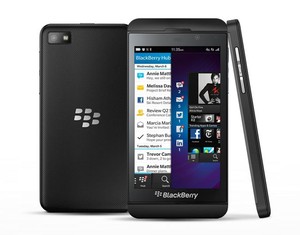
This is news for people who have a BlackBerry Z10 on AT&T. The AT&T 10.1 update is now available and ready for use. BlackBerry 10 is the new operating system that is set to pull the BlackBerry out of oblivion. Sales figures for BlackBerry mobile devices have been plummeting for quite a while now. The BlackBerry has gone from a highly popular device in the US, to a device that is being outsole by regular mobile phones, as the Android, Windows and iOS Smartphones dominate the market.
People who have a BlackBerry Z10 on AT&T
If you want the update then it can be downloaded at the moment via the BlackBerry Software management app, although it will soon be available for all people to auto-download when AT&T releases it over the air (OTA).
They have made lots of little improvements
For example, the red eye function has been improved, and it is now easier to call international phone numbers. They have made lots of little improvements that are not going to make the headlines, but that are going to be noticeable once you have installed the update.
It is easier to pinpoint things
They have improved cursor control to make it easier to select things on the screen. It allows you to use cursors by tapping the screen. You grab the cursor and then drag it to wherever you need it to be before actually clicking it. You can even manipulate the cursor with taps too by tapping to the left or right of the cursor. It will move left or right by one character in a piece of text. It is far more precise than using your finger and allows you to quickly select where you want your pointer to be when writing.
The BlackBerry Hub
It just allows you to keep all of your notifications and messages in one place. It has support for direct communication with Pin to Pin messaging that allows people to communicate between Smartphones. It is easier to view your emails with the new update, along with any attachments that have been sent along with the email.
It has a Time Shift mode
This is a nice little feature that allows you to move your picture backwards or forwards in time. It takes the photo in HDR so that it is more like a short movie. You can look at the picture and move it back and forth in time until you find the perfect shot, which then becomes your saved image.
The HDR (high dynamic range) means that you do not have to take your photo at one exposure level. It takes a number of photos and each has a different exposure and layer. It combines all of these photos and picks the ones with the best exposure on the entire screen, which it not merges to create your perfect photo.
You are able to personalize your notifications
You can personalize them with your contacts, accounts and whatever other functions you have on your BlackBerry. You are able to customize things such as your ringtone, LED light and vibration depending upon who is texting and calling you. That way you will know who is calling/texting before you actually see your BlackBerry.
It has Skype support
Skype is still popular so BlackBerry have improved their support with the hopes that more people will use Skype on their BlackBerrys. You can also turn off your alerts for some apps, including your Skype app if you are busy or do not want to be bothered.
Conclusion
BlackBerry Z10 owners are not going to be disappointed. Sometimes an update is not very well received and it causes a bit of a ruckus in the online community, but this update seems to be well received. It may be because they did not make big changes and alienate or scare their users (such as what Facebook has been accused of doing). Instead they have opted for smaller changes and tweaks that simply make the BlackBerry easy to use.
They have tackled some of the niggling little problems that some people complain about, such as by introducing the movable cursor for selecting smaller things such as text. And, they have improved a few things that people didn’t even know was inconvenient, such as being able to copy and paste a phone number from your contacts to just about anywhere.
Will it help revive the BlackBerry? The new operating system is really what will (or will not) revive the BlackBerry, but this update is still another step in the right direction.
Byline
This post is written by Kate Funk. She is a professional blogger and writer at www.speaken.net. She specializes in topics of interest to techno geeks and networking enthusiasts.